
How to pick your Notchpals crew, starting with your weakest habit
Blip looks after your eyes, and you choose two more areas. How to pick them from the habits you slip on most, match characters to your taste, and choose a host.
Start with the habit you are worst at. Blip is always in your crew for Eyes, so during setup you pick two more areas. Choose the two parts of the day that most often go wrong for you, then pick the character in each area whose voice you would actually like to hear. You can change all of it later, so the first pick does not have to be perfect.
This post goes through how a crew works, how to find your two areas, who looks after each one, and how to choose a host.
How a crew works
A few rules shape every crew:
- One character per area. There are 10 areas, and your crew has at most one character in each.
- Blip plus two. Blip, a wide-eyed alien, always looks after Eyes. In setup you add two more areas.
- What buying includes. Buying Notchpals includes Blip plus two characters you pick. Any other character can be added later in the Browse window.
- Some characters are add-ons only. Nani, Achaar and Pinky Aunty (Meals), Grandpa Ravi (Posture), Chintu (Movement) and Chui Mui (Self-care) are never among the two you pick. You can add them later.
- One on stage at a time. However big the crew, only one character visits at once.
One rule matters more than it looks. Repeating reminders (water, posture checks, eye breaks, stretches, blinks) all draw on one daily allowance for the whole crew, which you choose under "Repeating reminders a day" in Settings: Calm, Normal or Chatty. Adding a Water character to a crew that already has Posture does not double the nudges. The same number gets shared more ways. What a new area does add is its own timed and situational moments, such as lunch, the wind down before bed or a low battery warning.
Start from your weakest habit
Read down this table and notice which lines make you wince.
| If this sounds like you | Try this area |
|---|---|
| It is 3 PM and you have not had a glass of water | Water |
| Lunch happens at four, at the keyboard, or not at all | Meals |
| You catch yourself hunched, nose close to the screen | Posture |
| You look up and two hours have passed in the chair | Movement |
| You are still at the Mac at midnight, again | Sleep |
| A quick look at messages turns into twenty minutes | Focus |
| Whole days pass without a slow breath or a call to a friend | Self-care |
| Your MacBook dies before you notice the battery, or the disk is always full | Tech care |
| You keep joining calls late because the banner slid past | Schedule |
Eyes is already covered. If more than two lines apply, a good rule is to pair one area that repeats through the day (Water, Posture, Movement) with one built around a time of day (Meals, Sleep, Schedule). That way you get regular small nudges and one or two moments that shape the day, such as lunch at lunchtime or a nudge before bed.
The areas, and who looks after each
Every area has its own characters, and they really do sound different. Here they all are, with a word on what each area covers. The full list of moments and their hours is in everything Notchpals can remind you about.
Water


Melo is a watermelon who is very proud of how watery it is and a little smug about how much less watery you are. Puddle is a fluffy seal pup who claps for every sip. Both cover a first glass in the morning, water through the day and an afternoon glass.
Meals


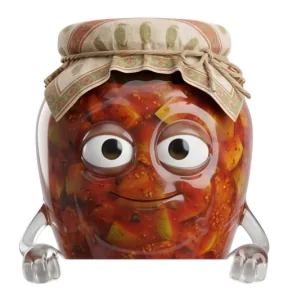

Mirchi, a chili with a very short fuse, is the Meals character you can choose as one of your two, and it shouts about lunch in capital letters. Nani, Achaar and Pinky Aunty are add-ons. Meals come within an hour either side of the breakfast, lunch, snack and dinner times you set.
Posture



The two posture characters you can pick are a good example of how much voice matters. Both remind you to sit back. Sir Pounce, a posh cat, does it like this:

Sir PounceBack against the chair, if you please. It's a throne, not a hammock.
Barnaby, a butler, does the same job with more patience:

BarnabyMight I suggest the back of the chair? It has been waiting very patiently.
Grandpa Ravi, who has opinions about your posture, is an add-on.
Movement




Coach Flex is a loud hype man who treats standing up as a sport. Bizzy is a bumblebee who is thrilled about everything. Honk is a goose with a plan, and the plan is chaos. Chintu, ten years old and cricket mad, is an add-on. Whichever you choose, the stand-up reminder only comes after an unbroken 55 minutes at the Mac.
Eyes
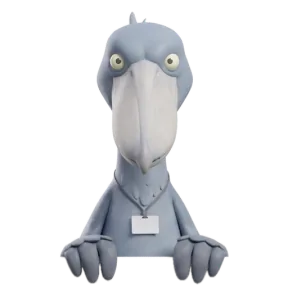

Blip is always there to start with. Bill, a shoebill, says very little and stares until you look away. Blush is a shy chameleon. Since a crew has one character per area, adding Bill or Blush later means they take over Eyes from Blip.
Sleep



Boo is a shy ghost who apologizes for mentioning bedtime. Snooze, a sloth, sounds half asleep already. Bramble is a soft-spoken hedgehog. Bitsy is a toddler who insists on being the boss of bedtime. Your bedtime is set in Settings.
Focus

Bolt, a retro robot with no patience for nonsense, is the only Focus character. You need it in the crew to start a 25 or 50 minute focus session from the menu bar. Its scrolling check watches a fixed list of chat, news, video and game apps, not browsers.
Self-care


Kapi is the calmest capybara alive. Boba is a tiny dragon who thinks you are wonderful. Chui Mui, a touch-me-not plant, is an add-on.
Tech care
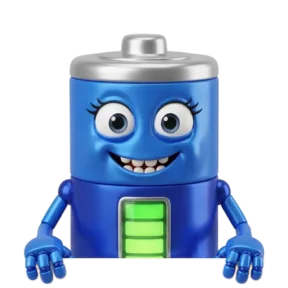
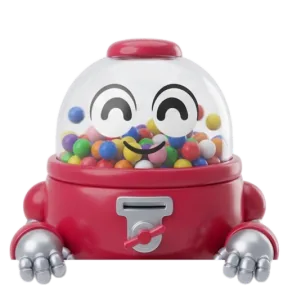
Juice is a battery with a flair for drama. Gumdrop is a cheerful gumball robot. Both look after battery, restarts and storage. On a Mac with no battery, Tech care comes down to restarts and disk space.
Schedule
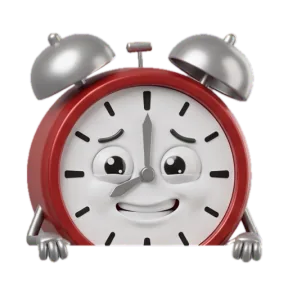


Ticky is an alarm clock who panics on the hour. Biscuit is a hamster with a lot of worries. Honey is named Honey and is not sweet. Schedule characters can read your calendar, only if you allow it, and then only the time your next meeting starts.
Match the voice to your taste
Once you know your areas, pick the character you would put up with at 4 PM on a bad day. The crew falls roughly into three moods:
- Gentle: Puddle, Barnaby, Blush, Boo, Bramble, Kapi.
- Bossy: Mirchi, Sir Pounce, Bill, Bitsy, Bolt, Honey.
- Silly: Blip, Bizzy, Honk, Coach Flex, Juice, Ticky.
A useful mix is a bossy character for the habit you resist most and a gentle one for the area where a shout would just annoy you, which for many people is sleep. A line that makes you smile is easier to act on than one that makes you sigh, so trust your first reaction.
You don't have to guess. In the Browse window, "Try in notch" lets you see any character in the notch before you commit to it.
Choose a host
One member of the crew is the host. The host says good morning the first time you are at the Mac each day between 5 AM and noon, welcome back after you have been away for 15 minutes or more, and happy birthday if you set your birthday. That makes the host the character you see most often outside its own reminders, so choose one whose face you would like to see first thing. Browse has a "Make host" button for this.
Changing your mind later
Nothing about the first crew is permanent. You can change it in Settings > Crew, from "Your crew" in the menu bar, or in Browse with "Add to crew" and "Make host". If the crew feels too quiet or too talkative, change "Repeating reminders a day" in Settings rather than the characters. If you are setting up for the first time, your first day with Notchpals walks through what to expect, and meet Notchpals covers how a visit works.
More on using notchpals
 Using NotchpalsMeet Notchpals: the characters who live in your Mac's notchNotchpals is a Mac app whose characters peek out of the notch to remind you to drink water, rest your eyes, move and sleep. How it works, and who it is for.
 Using NotchpalsReminders that know when not to remind youHow Notchpals stays quiet on calls, in full screen apps and while you are away, keeps each moment to its hour, and what it does not detect.
 Using NotchpalsWhat Notchpals knows about you, and what it never seesNo account and no analytics. What Notchpals reads on your Mac to time a reminder, why it needs each thing, and the only reasons it ever goes online.