
Everything Notchpals can remind you about, area by area
A tour of the 10 Notchpals areas, from water and lunch to battery and meetings: what each one reminds you about, when, and crews for different days.
Notchpals covers ten areas of a working day at a Mac: Water, Meals, Posture, Movement, Eyes, Sleep, Focus, Self-care, Tech care and Schedule. Every character belongs to one area, and it brings that area's moments: a glass of water mid-morning, lunch at lunchtime, a stretch, a nudge to get to bed, a warning before your battery runs out or your next meeting starts.
Your crew holds at most one character per area, so the areas you pick decide what you get reminded about. This post walks through all ten, with one character from each, then suggests crews for a few common kinds of day.
How the moments work
Each area has a few moments, and they come in three kinds.
- Timed moments come at most once a day, in their own window: breakfast in the morning, the bedtime line after your bedtime.
- Repeating moments (water, posture checks, shoulders down, eye breaks, blinks, stretches) draw on one daily allowance for your whole crew. "Repeating reminders a day" in Settings sets it to four, eight or twelve (Calm, Normal or Chatty), so adding an area spreads the same number further rather than adding more.
- Triggered moments wait for something to happen: 55 minutes at the Mac in a row, a battery running low, a meeting about to start.
The times below are the defaults, and the app counts only time you actually spend at the Mac. Most areas have two or more characters to choose from, but your crew holds one of them, so only that one visits. The crew also stays quiet on calls, in full screen apps and while you are away, which reminders that know when not to remind you covers in detail. Separately from the areas, one crew member is your host and says good morning, welcome back, and happy birthday if you set your birthday.
Body: water, meals, posture and movement




Water
Melo, a watermelon who is 92 percent water, or Puddle, a seal pup, looks after drinking. There is a first glass of water between 8 and 11 AM, after your first 15 minutes at the Mac; a repeating water reminder from 9 AM to 8 PM; and one afternoon water between 2 and 5 PM, for the stretch when coffee tends to win.
Meals
Mirchi, a chili with a very short fuse, runs Meals. Breakfast comes between 7 and 10:30 AM, lunch between 12:30 and 2:30 PM, a snack between 4 and 5:30 PM and dinner between 7:30 and 9:30 PM, each once a day. You can set your own meal times in Settings, and each meal then comes within an hour either side of the time you chose.

MirchiLUNCH! Now! Whatever you're doing can wait! Your stomach can't!
Meals also has three add-on characters, Achaar, Nani and Pinky Aunty, which you can buy separately in Browse if Mirchi's shouting is not for you.
Posture
Sir Pounce, a posh cat, or Barnaby, a butler, keeps you upright, and Grandpa Ravi is an add-on. Posture checks and shoulders down are repeating moments from 9 AM to 9 PM, and a screen distance check comes once, between 2 and 7 PM.
Movement
Coach Flex, Bizzy the bumblebee or Honk the goose gets you out of the chair, with Chintu as an add-on. Stand up comes after 55 minutes at the Mac in a row, between 8 AM and 10 PM. Stretches repeat across the same hours, and a short walk comes once, between 1:30 and 3:30 PM, which suits the walk after lunch.
Eyes and sleep

Eyes
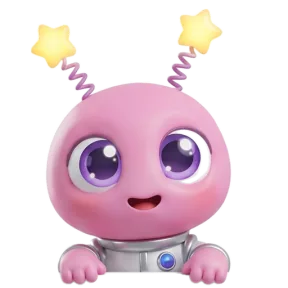
Blip, a tiny alien who finds everything on Earth amazing, is always included and starts every crew on Eyes. Bill the shoebill and Blush the chameleon are the other Eyes characters. Eye breaks follow the idea behind the 20-20-20 rule: look at something about 20 feet away for 20 seconds. Blink breaks remind you to take a few slow, full blinks. Both are repeating. Dim the screen comes once, between 9 PM and midnight.
Sleep
Pick one of Boo the ghost, Snooze the sloth, Bramble the hedgehog or Bitsy the toddler for the evening. Wind down comes in the hour before your bedtime, which you set in Settings (11 PM unless you change it). Bedtime comes after it, if you are still at the Mac. Very late is for anyone still at the Mac between 1 and 4:30 AM.
Focus and self-care


Focus
Bolt, a retro robot who has no time for nonsense, is the only Focus character, so it is Bolt or nobody here. Plan the day comes on weekday mornings between 8:30 and 11 AM, once. From the menu bar you can start a focus session of 25 or 50 minutes, and Bolt opens and closes it. While it runs, Bolt has the stage to itself, apart from a critical battery warning or a meeting about to start. The scrolling check comes after 20 minutes in a row in a distracting app.

BoltInfinite feed detected. It is infinite. You are not. Close it.
That check is narrower than it sounds. It watches a fixed list of seven apps: the chat apps Discord, Telegram, WhatsApp and Messenger, plus Steam, Apple TV and Apple News. Browsers are not on it, and the list cannot be edited.
Self-care
Kapi, the calmest capybara alive, or Boba, a tiny dragon, looks after you, and Chui Mui is an add-on. Breathe comes after 90 minutes at the Mac in a row, between 10 AM and 8 PM. A check-in asks how you are, once, between 11 AM and 5 PM. On weekends, once a week, there is a nudge to call someone. In the evening, between 6 and 9 PM, comes one good thing: a moment to name something that went well.
The Mac and the day: tech care and schedule

Tech care
Juice, a battery with a flair for drama, or Gumdrop, a gumball robot, looks after the Mac itself. Battery low comes below 20 percent when the Mac is not charging, and battery critical below 8. Plug in after a low battery warning and you get a charging line.

JuiceUnder twenty percent! I feel faint. Tell my story. And find a charger!
There is also a restart reminder after a week without one, between 9 AM and 6 PM and at most weekly, and a storage warning when the startup disk has under 10 percent free, also at most weekly.
Schedule
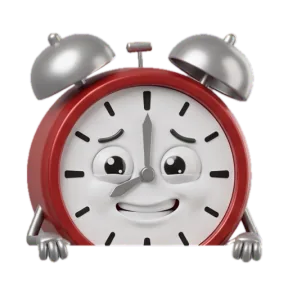
Ticky, an alarm clock who panics on the hour, Biscuit the hamster or Honey, who will fight your deadline, keeps your day on track. Meeting soon comes 3 to 10 minutes before a meeting on your calendar, if you allow calendar access, and Notchpals reads only the start time. Wrap up comes on weekdays between 6 and 7:30 PM, once. On weekend days, after 45 minutes at the Mac, comes a nudge to log off and have the day.
Crews for different kinds of days
Setup puts Blip in for Eyes and asks you to pick two more areas, and buying Notchpals includes Blip plus 2 characters you pick. Any other character can be added later from Browse, where you can also try one in the notch first. These are starting points, not rules.
| Kind of day | Start with | Worth adding later |
|---|---|---|
| Office job, lots of meetings | Blip, Ticky, Sir Pounce | Melo for water |
| Developer or designer, long spells of flow | Blip, Coach Flex, Bramble | Mirchi for meals |
| Student | Blip, Bolt, Boo | Mirchi for meals |
| Remote worker, home alone | Blip, Honk, Kapi | Honey for the end of the day |
A few reasons behind those picks:
- Meetings make the Schedule area earn its place, and posture tends to slide on long calls.
- Flow is where hours vanish, so Coach Flex's stand up after 55 minutes and Bramble's very late check matter most. If you look up at 3 PM and realize you never ate, forgetting to eat when you are focused is worth a read, and Mirchi is there for exactly that.
- Studying suits Bolt's plan the day and focus sessions, and Boo keeps the late nights in check.
- Working from home removes the walk to anywhere, so Honk's short walk helps, and Kapi's weekend call nudge fills a gap that an office fills without trying.
Last, pick your host with care. It is the first character you see each morning, so choose the character whose good morning you would actually like to hear.
More on using notchpals
 Using NotchpalsHow to pick your Notchpals crew, starting with your weakest habitBlip looks after your eyes, and you choose two more areas. How to pick them from the habits you slip on most, match characters to your taste, and choose a host.
- Using NotchpalsMeet Notchpals: the characters who live in your Mac's notchNotchpals is a Mac app whose characters peek out of the notch to remind you to drink water, rest your eyes, move and sleep. How it works, and who it is for.
 Using NotchpalsReminders that know when not to remind youHow Notchpals stays quiet on calls, in full screen apps and while you are away, keeps each moment to its hour, and what it does not detect.